
Web (Oxygen)
PerfCheckerWeb serves a browser interface for suite selection, local or remote execution, progress and saved results. Oxygen hosts the interface; measurements run in separate workers.
Connect to a remote server
Open your service's HTTPS address, for example https://perf.example/perfchecker/v1/, and enter the personal access token issued by its operator. This is an example hostname, not a hosted PerfChecker service. The Julia controller must remain running.
In Execution → Worker, This server measures the controller's machine. Any remote agent, or a named registered agent, sends the selected plan to a separate worker service. Review the workload, collector, versions and selected run count, then choose Launch selected runs. Follow its ID in Jobs and open the completed report in Results.
A browser connection to another computer does not itself enable remote-worker execution. The operator must deploy the same suite and compatible dependencies to the controller and worker, configure authentication, and start the worker below. Saved-directory viewers cannot launch these jobs.
Install and start a controller
Prepare a controller project separate from the measured target and from Pluto: PerfCheckerWeb 1.0.0 is registered in General.
import Pkg
Pkg.activate("perf/controller")
Pkg.add([
    Pkg.PackageSpec(name = "PerfChecker", version = "1.1"),
    Pkg.PackageSpec(name = "PerfCheckerWeb", version = "1.0.0"),
])
Published Core has a known ARM import limitation. Install the collectors used by your suite deliberately. Load the suite from your package root, then start a local service:
using PerfChecker, PerfCheckerWeb, BenchmarkTools

suite = load_software_suite("perf/suite.jl")
serve_suite(suite; host = "127.0.0.1", port = 8080,
    profile = :quick, reports_root = "perf/results")
Open http://127.0.0.1:8080/perfchecker/v1/ on that machine. This call serves the suite; it does not start a measurement merely because the page opens.
Allow authenticated remote connections
Create the token store described below. For an HTTPS reverse proxy forwarding the complete /perfchecker/v1/ prefix:
auth = studio_token_authenticator("perf/users.toml")
serve_suite(suite; host = "0.0.0.0", port = 8080,
    profile = :quick, reports_root = "perf/results",
    allow_remote_control = true, authenticator = auth,
    secure_cookies = true)
Use the reachable HTTPS hostname in the browser. 0.0.0.0 is a binding address, not a destination. Restrict access to the intended network and users. The suite overload refuses a non-loopback binding unless both remote control and authentication are explicitly enabled. Its guard does not apply to every serve_suite overload.
Start a remote worker
On the worker host, prepare the same suite revision, target dependencies and collectors. Check its runtime, platform, native tools and permissions for the requested measurement. Then run:
using PerfChecker, PerfCheckerWeb, BenchmarkTools

suite = load_software_suite("perf/suite.jl")
run_studio_agent(suite;
    server = "https://perf.example/perfchecker/v1",
    agent_id = "linux-amd64-01",
    token = ENV["PERFCHECKER_AGENT_TOKEN"])
Here an agent is a worker service, not an AI assistant. It polls the controller, checks the selected plan revision against its local suite, runs that plan and uploads results or a failure. It does not start its own Web server or receive arbitrary Julia expressions as job payloads. Remote agent connections require HTTPS; deliberate loopback tests can use HTTP.
| Destination | Behavior |
|---|---|
local | Execute on the controller host |
agent:any | Wait for an agent to claim the job |
agent:linux-amd64-01 | Wait for that named agent |
A remote job progresses from waiting_agent to leased, then complete when the uploaded result is accepted. A plan mismatch fails the attempt; there is no silent fallback to the controller. Registration and a matching plan do not establish that two hosts produce comparable measurements.
Reopen saved results
In an environment also containing PerfCheckerMakie and WGLMakie:
using PerfChecker, PerfCheckerWeb, PerfCheckerMakie, WGLMakie
serve_suite("perf/results"; host = "127.0.0.1", port = 8080)
Open the same local URL. This overload reads saved reports and bundles; it does not provide the suite controller's job-launch capability. Filter results by package, feature, metric and view. Opening a plot reads saved observations without rerunning a check.
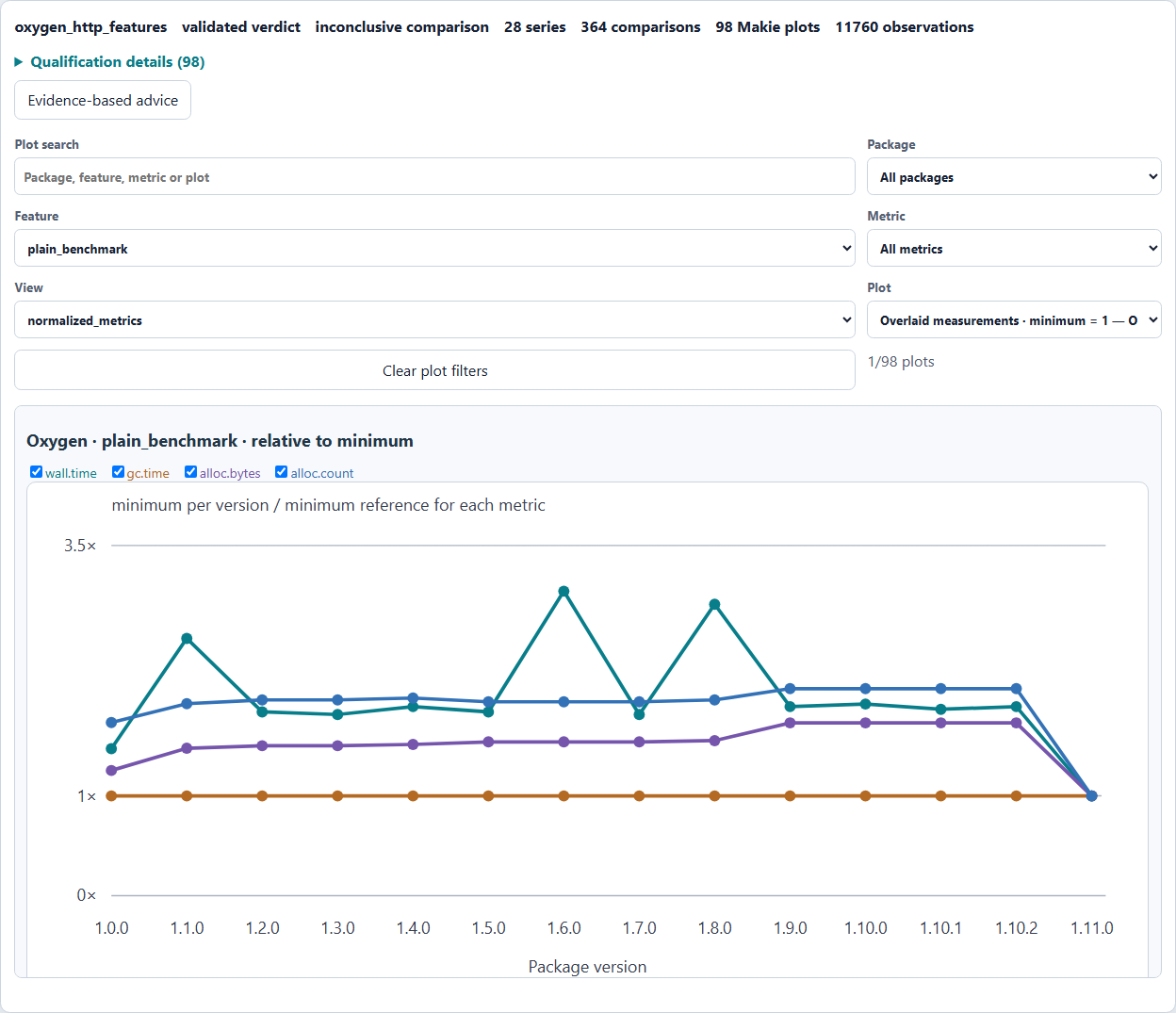
See the Oxygen experiment for its HTTP boundary and recorded history. Native items and shared scenarios use their own routes: TestItems and scenario studio.
Cancel and stop safely
Cancel immediately marks the controller job cancelled.
For a local job, wait for
worker_stateto finish cleanup.state="cancelled"withworker_state="cancelling"is still in progress. Cleanup failure changes the final job to failed and retains the error and private inventory paths.For a remote job, Cancel invalidates the lease and rejects a late result. It does not interrupt the agent's synchronous measurement. Interrupt that agent once on its host and let cleanup finish. Heartbeats report progress rather than stop commands.
An interrupt or cleanup failure stops the agent before another claim. Expired leases can be retried up to max_agent_attempts; controller restart also recovers leased work. Workloads must tolerate replay.
Force-killing either process can leave workers or allocation traces behind. Use allocation cleanup and ownership before recovery. A remote response with worker_state=null cannot establish that its process has stopped.
Authentication and browser sessions
The built-in store contains SHA-256 token digests and roles. Create perf/users.toml with your own token digests:
[[users]]
id = "operator"
token_sha256 = "REPLACE_WITH_64_HEX_DIGEST"
roles = ["runner"]

[[users]]
id = "worker"
token_sha256 = "REPLACE_WITH_ANOTHER_64_HEX_DIGEST"
roles = ["agent"]
agent_ids = ["linux-amd64-01"]
The placeholders fail validation until replaced. Compute a digest from a privately supplied token with bytes2hex(SHA.sha256(ENV["PERFCHECKER_STUDIO_TOKEN"])) after using SHA. The original token authenticates; its digest does not. runner permits job creation, agent permits leasing, and admin permits administration. Scope and rotate tokens; keep them outside source and logs. A custom authenticator/authorizer can integrate an existing identity service.
Browser login exchanges a token for an HttpOnly session cookie. Browser actions use CSRF checks. Sessions expire after session_hours (default eight); there is currently no Sign out button. To revoke the session from the Studio browser console:
const base = document.body.dataset.apiBase;
const session = await fetch(`${base}/session`).then(r => r.json());
const response = await fetch(`${base}/session`, {
  method: "DELETE",
  headers: { "X-CSRF-Token": session.csrf_token }
});
if (!response.ok) throw new Error(`Sign out failed: ${response.status}`);
console.log(await response.json());
Expected response: {"signed_out":true}. This expires the browser session; rotate the original bearer token separately if required. Transport security, service isolation, token rotation, report retention and backups remain deployment responsibilities.
Scripted HTTP inspection and launch
Install HTTP and JSON in the client. Set PERFCHECKER_STUDIO_URL to your HTTPS API prefix and PERFCHECKER_STUDIO_TOKEN to a runner token:
using HTTP, JSON
base = rstrip(ENV["PERFCHECKER_STUDIO_URL"], '/')
headers = ["Authorization" => "Bearer " * ENV["PERFCHECKER_STUDIO_TOKEN"]]
plan = JSON.parse(String(HTTP.get(base * "/suite-plan?profile=quick", headers).body))
foreach(row -> println(row["id"], " · ", row["package"], " · ",
    row["feature"], " · ", row["backend"], " · ", row["status"]), plan["runs"])
Review the actual rows, then paste one reviewed ID:
chosen_id = "PASTE_REVIEWED_RUN_ID"
payload = Dict("profile" => "quick", "plan_revision" => plan["plan_revision"],
    "selected_run_ids" => [chosen_id], "execution_target" => "agent:linux-amd64-01")
response = HTTP.post(base * "/jobs",
    [headers; "Content-Type" => "application/json"], JSON.json(payload))
job = JSON.parse(String(response.body))
status = JSON.parse(String(HTTP.get(base * "/jobs?id=" * job["job_id"], headers).body))
println(status["state"], " · reports ready: ", status["reports_ready"])
An accepted launch returns HTTP 202 and perfchecker-studio-job/1; acceptance is separate from completion. Poll the same job until complete, failed or cancelled and inspect its final report. POST /jobs/cancel accepts {"job_id":"…"}. GET /capabilities describes read-only status, profiles and concurrency; GET /me returns authenticated identity.
For 401, check the actual token and service. For 403, check roles. For 409 suite plan is stale, fetch and review a fresh plan. For 400, inspect the reported profile, selection or override error. For 404, verify the exact job ID and server address.
Supplied package examples and versions
From examples/bibliography/:
julia setup.jl web
julia --project=.controller/web web.jl
Open http://127.0.0.1:8871/perfchecker/v1/ while that process runs. Select Bibliography → export_bibtex → benchmark, review the plan, then launch.
From examples/kitchen-sink/, prepare with julia setup.jl web, then run julia --project=.controller/web web.jl datastructures or julia --project=.controller/web web.jl oxygen. Open the printed local address (port 8873). Reports go under results/web-datastructures or results/web-oxygen. Passing results/ACTUAL-RUN instead opens a saved-result viewer.
The cleanup behavior here needs Core 1.0.1+, with registered Web companion 1.0.0; the installation above selects Core 1.1. The older root v1.0.0 tag lacks the corrected interruption path. Companion and Core versions are independent. Remote cancellation remains a logical lease change even with corrected local cleanup.